Usage
3 minute read
Prequisites
For these examples the basic Motorcortex Anthropomorphic Robot application is used. You can download it from the Motorcortex Store and follow along. Make sure to have the Motorcortex Anthropomorphic Robot application running and that you can connect to it using the DESK-Tool.
Example website
For these examples, we have created a simple website in which we will show how to use motorcortex-js. The principles remain to same when applying to your own website. This is mere to visualise and explain the motorcortex.js package. To set up the example website, follow the steps:
-
Create a new folder for the project and navigate to it in your terminal.
-
Run
npm initto create a new Node.js project. -
Install motorcortex-js by running
npm install @vectioneer/motorcortex-js. -
Create an
index.htmlfile and amain.jsfile in the project folder. -
Paste the following code into index.html
<!doctype html> <html lang="en"> <head> <meta charset="utf-8" /> <meta name="viewport" content="width=device-width,initial-scale=1" /> <title>MotorCortex Logger</title> <style> * { margin: 0; padding: 0; box-sizing: border-box; } body { font-family: 'Consolas', 'Monaco', 'Courier New', monospace; background: #1e1e1e; color: #d4d4d4; padding: 20px; } h1 { color: #4ec9b0; margin-bottom: 20px; font-size: 24px; } #log-container { background: #252526; border: 1px solid #3e3e42; border-radius: 4px; padding: 15px; height: calc(100vh - 150px); overflow-y: auto; font-size: 13px; line-height: 1.5; } .log-entry { margin-bottom: 8px; padding: 4px 8px; border-radius: 3px; } .log-entry.info { color: #4fc1ff; } .log-entry.success { color: #4ec9b0; } .log-entry.error { color: #f48771; background: rgba(244, 135, 113, 0.1); } .log-entry.data { color: #ce9178; } .log-entry .timestamp { color: #858585; margin-right: 10px; } </style> </head> <body> <h1>MotorCortex Connection Logger</h1> <button id="restart-btn" style="margin-bottom: 15px; padding: 8px 16px; background: #0e639c; color: white; border: none; border-radius: 4px; cursor: pointer; font-size: 14px;">Restart</button> <div id="log-container"></div> <script src="./node_modules/@vectioneer/motorcortex-js/dist/motorcortex.js"></script> <script src="./main.js"></script> </body> </html> -
Paste the following code into main.js
// Browser logger for displaying console output in the HTML page const logContainer = document.getElementById('log-container'); const restartBtn = document.getElementById('restart-btn'); function log(message, type = 'info') { const entry = document.createElement('div'); entry.className = `log-entry ${type}`; const timestamp = new Date().toLocaleTimeString(); entry.innerHTML = `<span class="timestamp">${timestamp}</span>${message}`; logContainer.appendChild(entry); logContainer.scrollTop = logContainer.scrollHeight; } // Intercept console methods for logging to the page const originalLog = console.log; const originalError = console.error; console.log = function(...args) { originalLog.apply(console, args); const message = args.map(arg => { if (typeof arg === 'object') { return JSON.stringify(arg, null, 2); } return String(arg); }).join(' '); log(message, 'info'); }; console.error = function(...args) { originalError.apply(console, args); const message = args.join(' '); log(message, 'error'); }; // ============================================================================ // MAIN FUNCTION - Put your examples here // ============================================================================ async function main() { } // ============================================================================ // Restart button handler restartBtn.addEventListener('click', () => { logContainer.innerHTML = ''; // Clear logs console.log("--- Restarting ---"); main(); }); // Start main function on page load main(); -
Open
index.htmlin your web browser to see the example website in action.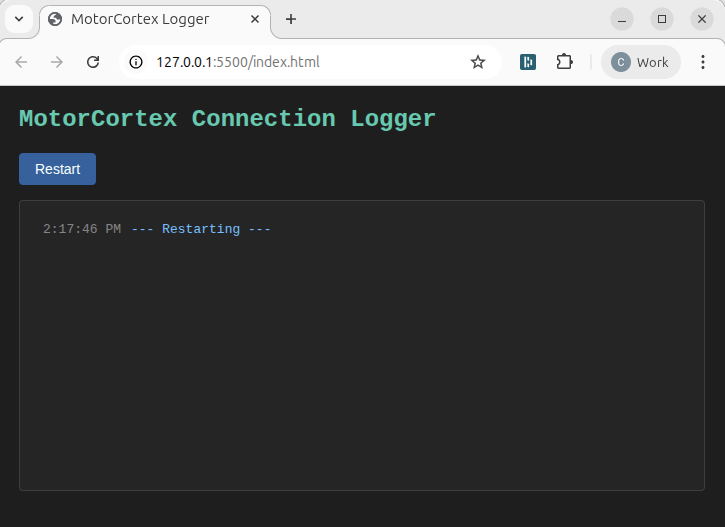
Motorcortex-javascript examples
Using Motorcortex javascript clients you can create powerful applications that interact with Motorcortex applications. This chapter provides several examples that demonstrate how to use motorcortex-javascript to:
-
Fundamentals
This chapter will show the fundamental concepts of motorcortex-javascript.