Startup
4 minute read
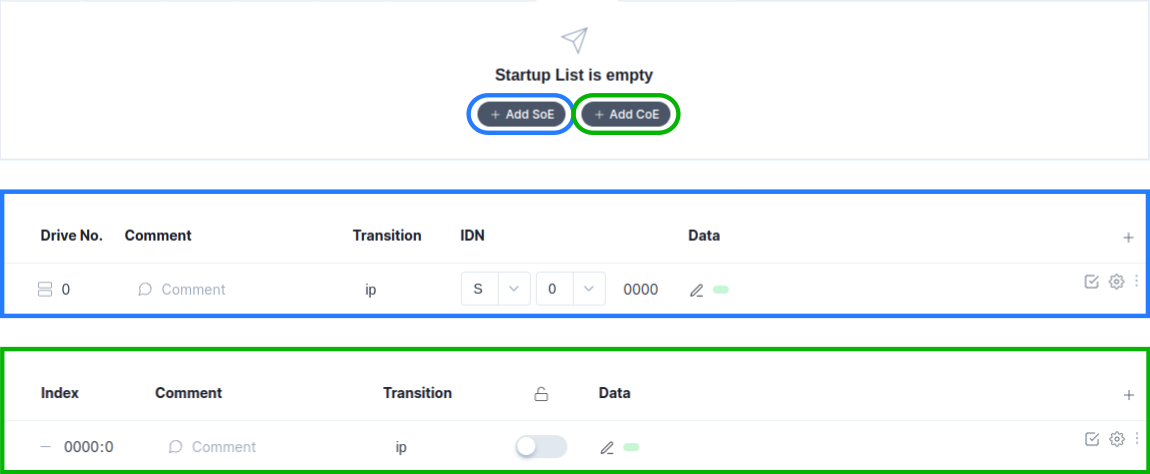
A startup list is loaded each time the device power cycles, it parametrizes your device with the set of configured parameters
-
In the main screen of the
startup tab, you can add startup parameters forCoE,SoEandEoE. Either manually or via uploading a startup parameter list. -
Pressing the Upload button, opens a tab in which you can upload a startup.xml parameter file for example:
<?xml version="1.0" encoding="ISO-8859-1"?>
<EtherCATMailbox>
    <CoE>
<!-- Input Type Analog Input 01-->
        <InitCmds>
            <InitCmd>
                <Transition>PS</Transition>
                <Comment><![CDATA[Input Type]]></Comment>
                <Timeout>0</Timeout>
                <Ccs>1</Ccs>
                <Index>63488</Index>
                <SubIndex>01</SubIndex>
                <Data>0000</Data> <!-- -10..+10V -->
                <!--<Data>0100</Data> --> <!-- 0..+20mA -->
                <!--<Data>0200</Data> --> <!-- 4..+20mA -->
                <!--<Data>0300</Data> --> <!-- 0..+10V -->
            </InitCmd>
        </InitCmds>
    </CoE>
</EtherCATMailbox>
<?xml version="1.0" encoding="utf-8"?>
<EtherCATMailbox>
  <SoE>
    <InitCmds>
      <InitCmd>
        <Transition>PS</Transition>
        <Comment><![CDATA[Telegram type]]></Comment>
        <Timeout>0</Timeout>
        <OpCode>3</OpCode>
        <DriveNo>0</DriveNo>
        <IDN>15</IDN>
        <Elements>64</Elements>
        <Attribute>0</Attribute>
        <Data>0700</Data>
      </InitCmd>
    </InitCmds>
  </SoE>
</EtherCATMailbox>
<?xml version="1.0" encoding="ISO-8859-1"?>
<EtherCATMailbox>
  <EoE>
    <InitCmds>
      <InitCmd Fixed="true">
        <Transition>IP</Transition>
        <Transition>PS</Transition>
        <Comment><![CDATA[eoe init]]></Comment>
        <Timeout>0</Timeout>
        <Data>020000000f0000000201051003e97b02000a00ffffff0102000a000000000000000000000000000000000000000000000000000000000000000000000000</Data>
        <!-- 02000000 --> <!-- Header[4] -->
        <!-- 0f000000 --> <!-- Flags[4] -->
        <!-- 0201051003e9 --> <!-- MAC Address[6] is 02:01:05:10:03:e9 -->
        <!-- 7b02000a --> <!-- Ip Address[4] is 10.0.2.123 -->
        <!-- 00ffffff --> <!-- Subent Mark[4] is 255.255.255.0  -->
        <!-- 0102000a --> <!-- Gateway[4] is 10.0.2.1-->
        <!-- 00000000 --> <!-- Dns Server[4] -->
        <!-- 0000000000000000000000000000000000000000000000000000000000000000 --> <!-- Dns Name[32] -->
      </InitCmd>
    </InitCmds>
  </EoE>
</EtherCATMailbox>
<?xml version="1.0" encoding="ISO-8859-1"?>
<EtherCATMailbox>
    <CoE>
<!-- Input Type Analog Input 01-->
        <InitCmds>
            <InitCmd>
                <Transition>PS</Transition>
                <Comment><![CDATA[Input Type]]></Comment>
                <Timeout>0</Timeout>
                <Ccs>1</Ccs>
                <Index>63488</Index>
                <SubIndex>01</SubIndex>
                <Data>0000</Data> <!-- -10..+10V -->
                <!--<Data>0100</Data> --> <!-- 0..+20mA -->
                <!--<Data>0200</Data> --> <!-- 4..+20mA -->
                <!--<Data>0300</Data> --> <!-- 0..+10V -->
            </InitCmd>
        </InitCmds>
    </CoE>
    <EoE>
        <InitCmds>
            <InitCmd Fixed="true">
                <Transition>IP</Transition>
                <Transition>PS</Transition>
                <Comment><![CDATA[eoe init]]></Comment>
                <Timeout>0</Timeout>
                <Data>020000000f0000000201051003e97b02000a00ffffff0102000a000000000000000000000000000000000000000000000000000000000000000000000000</Data>
                <!-- 02000000 --> <!-- Header[4] -->
                <!-- 0f000000 --> <!-- Flags[4] -->
                <!-- 0201051003e9 --> <!-- MAC Address[6] is 02:01:05:10:03:e9 -->
                <!-- 7b02000a --> <!-- Ip Address[4] is 10.0.2.123 -->
                <!-- 00ffffff --> <!-- Subent Mark[4] is 255.255.255.0  -->
                <!-- 0102000a --> <!-- Gateway[4] is 10.0.2.1-->
                <!-- 00000000 --> <!-- Dns Server[4] -->
                <!-- 0000000000000000000000000000000000000000000000000000000000000000 --> <!-- Dns Name[32] -->
            </InitCmd>
        </InitCmds>
    </EoE>
</EtherCATMailbox>
- Pressing the
Add Item, adds a manual configuration field.
Manual Configuration of CoE Startup Parameters

-
At
- 0000:00, you need to define theObject IndexandSubindexinhex(Example:F800:01). -
At
Comment, define acommentfor example the name of the entry (Example:Input Type). -
At
Data, you need to configure the parameter used at startup. -
You can enable
Complete Accessto transfer all sub-indices in one data packet to the EtherCAT slave. -
With
include in EtherCAT message, you can either include or exclude the configured entry from the startup list. For more option you can press :- The
Add Itembutton, adds a new entry to the startup list. - The
Deletebutton, removes the entry from the startup list.
- The
Manual Configuration of SoE Startup Parameters

-
At
Drive No., you need to define the drive number. For single-axis devices, the drive number is typically 0. For multi-axis drives, each axis or motor controller is addressed by its specific index (e.g., drive 0, drive 1, etc.) -
At
Transition, you define between which transition state the parameter is applied. -
At
Comment, define acommentfor example the name of the entry. -
At
Data, you need to configure the parameter used at startup. -
For IDN you fill in the IDN number: S-x-yyyy/P-x-yyyy.
"S"for Standard data,"P"for Product-specific data.xparameter set usually from 0 to 7 and.yyyyData-block number usually from 0 to 4095.
-
With
include in EtherCAT message, you can either include or exclude the configured entry from the startup list. For more option you can press :- The
Add Itembutton, adds a new entry to the startup list. - The
Deletebutton, removes the entry from the startup list.
- The
Manual Configuration of EoE Startup Parameters

-
At
Comment, define acommentfor example the name of the entry (example:eoe init). -
At
Date: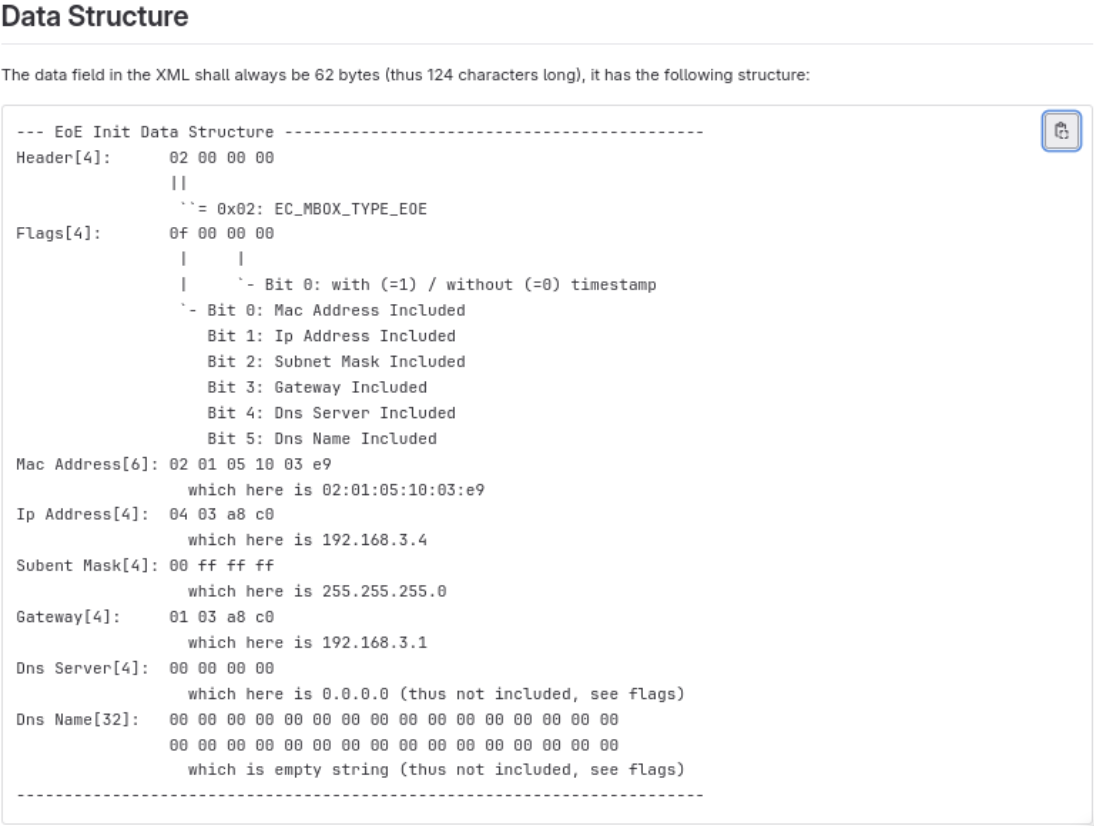
-
With
include in EtherCAT message, you can either include or exclude the configured entry from the startup list. For more option you can press :- The
Add Itembutton, adds a new entry to the startup list. - The
Deletebutton, removes the entry from the startup list.
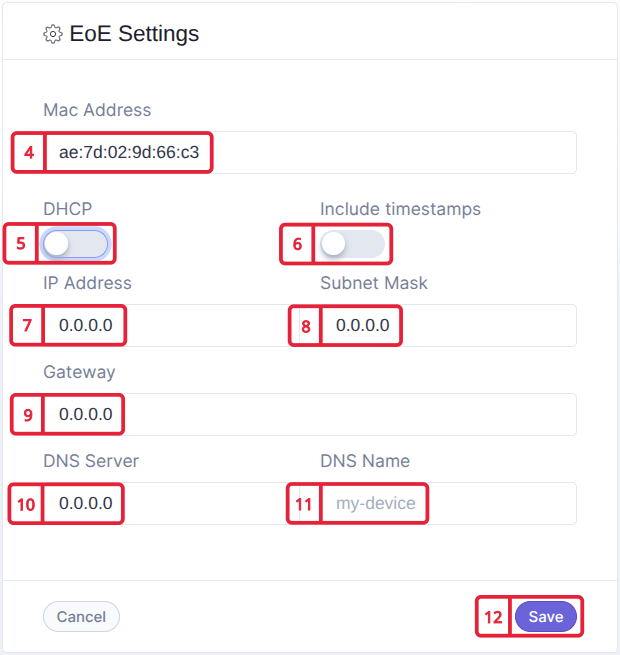
Pressing on , opens a visual editor, to configure EoE.
- The
-
Fill in the device MAC address.
-
Use to enable or disable DHCP.
-
Use to include or exclude timestamp to EoE package data.
-
Fill in the device IP Address.
-
Fill in the Subnet Mask.
-
Fill in the Gateway.
-
Fill in the DNS Server Address.
-
Fill in the DNS Name.