Manipulability
3 minute read
Close to a singular pose a robot loses a direction it can move in, and a small tool motion can need a large joint motion. Manipulability measures how far the robot is from such a pose: it is 0 at a singularity and grows further away. Motorcortex uses it in two ways: a detector warns and stops, and a lookup table slows Cartesian motion down.
Using the standard robot GUI?
The detector is under Manipulability on the robot GUI’s Alarms tab. Press Save Settings to keep your changes. The lookup table has no GUI fields; set it in Motorcortex Desk.
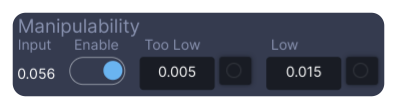
- Input: the current manipulability.
- Enable:
enable. - Too Low and Low:
tooLowandlow. The lights next to them areisTooLowandisLow.
Warning
Wrong manipulability settings can make the robot move suddenly near a singular pose. Try every change in simulation mode first.
Find your robot’s values
The value depends on the robot and has no unit, so look at it on your own robot first:
- In simulation mode, switch to manual joint mode. The detector is off in joint mode, so it does not stop you.
- Watch
root/ManipulatorControl/manipulabilityDetector/input. - Move one joint at a time towards a singular pose, such as a straight wrist or a fully stretched arm, and note the value where Cartesian motion should slow down, warn and stop.
Warn and stop
The detector is a window detector at root/ManipulatorControl/manipulabilityDetector/. It works only while the robot is engaged in manual Cartesian mode, or runs a Cartesian motion in automatic mode.
| Parameter | What it does | Standard robot configuration |
|---|---|---|
enable |
1 switches the detector on |
1 |
low |
At or below this value: warning 109, WA_CLOSE_TO_SINGULARITY |
0.015 |
tooLow |
At or below this value: emergency stop 507, ES_TOO_CLOSE_TO_SINGULARITY |
0.005 |
timeWindow |
How long, in s, the value must stay below a level before it trips | 0 |
input |
Output: the current manipulability | |
isLow, isTooLow |
Outputs: 1 once a level has tripped, until the errors are reset |
high and tooHigh exist too, but are not used.
Switching to manual Cartesian mode in a pose below tooLow gives the emergency stop straight away. Move the robot away from the singularity in manual joint mode first.
Slow down near a singularity
The lookup table at root/ManipulatorControl/manipulabilityGainLookup/ turns the manipulability into a speed factor, normally between 0 and 1, as in the Lookup row of the figure above. It draws straight lines between its points, and keeps the first and last value outside them. The factor slows down:
- Cartesian jog, while you move towards a singularity. Moving away is not slowed.
- Cartesian moves in automatic mode.
Joint jog and joint moves are not slowed.
| Parameter | What it does | Standard robot configuration |
|---|---|---|
numPoints |
How many points of x and y are used, at most 7 |
2 |
x |
The manipulability at each point. Must increase from point to point, or the factor becomes 0 |
0.005, 0.05 |
y |
The speed factor at each point | 1, 1: no slowing down |
gain |
Multiplies the result | 1 |
output |
Output: the speed factor in use |
- Set
numPoints, thenxfrom abouttooLowup to where slowing down should stop, andyrising to1at the last point. - In simulation mode, jog towards a singular pose in manual Cartesian mode and watch
output: the robot should slow down smoothly beforelowis reached. - Save the parameter tree.
Next: Configure the alarm devices.