AxesControl
AxesControl is the multi-axis orchestrator.15 minute read
AxesControl is the multi-axis orchestrator. It takes the motion you command
in axis space, conditions and limits it, converts it into actuator
space, runs one control loop per actuator, and converts the measurements
back.
It is where the distinction between an axis and an actuator lives:
- An axis is what you command — a joint of the kinematic model, a Cartesian direction, a virtual degree of freedom.
- An actuator is a physical drive with its own encoder, drive mode and control loop.
Two matrices relate them, so one axis may drive several actuators and one actuator may be shared by several axes — differential drives, tandem axes, belt couplings.
flowchart LR
    i1(["axesPositionsInput, axesVelocitiesInput, axesAccelerationsInput"]) --> B["AxesControl"]
    i2(["axesTorquesInput"]) --> B
    i3(["axesHomingJogVelocitiesInput, axesHomingGotoJog"]) --> B
    B --> o1(["axesPositionsActual, axesVelocitiesActual, axesAccelerationsActual"])
    B --> o2(["sensorTorquesActual"])
    B --> o3(["axesIsOpenLoop, axesIsReferencing"])
    B --> o4(["axesPositionsTargetLimited, axesPositionsReference, axesVelocitiesReference, axesAccelerationsReference"])
    B --> o5(["axesHomingJogDelta"])
    B --> o6(["axesPositionsTargetHardware, axesPositionsActualHardware"])
    B --> s1(["actuatorControlLoops — one per actuator"])
    B --> s2(["axesLimiters, smoothStop"])
    B --> s3(["axesTransducers — one per axis"])
    B --> s4(["axesJogRateLimiter, axesJogIntegrator"])
    B --> s5(["interpolators, axesSetpointJumpDetectors, axesTorqueDetectors"])
The number of axes and the number of actuators are fixed when the controller is built, and they need not be equal. So are the two matrices' dimensions.
Almost all the configuration is in the sub-trees. The per-axis limits are under
axesLimiters, and every actuator has a complete control loop of its own underactuatorControlLoops. Budget commissioning time per actuator, not per machine.
axesIsOpenLoopis the signal to watch. It tells you, per axis, whether the loop is genuinely closed. An axis driven by two actuators whose contributions cancel is not closed, and this output is what says so.
Each axis has its own transducer, under
axesTransducers/axesTransducer<NN>. It gives the axis a gain and a zero point of its own, so a coupled or differential axis can be referenced as an axis rather than one actuator at a time. With the defaults it is an exact identity, so a plain one-actuator-per-axis machine is unaffected and can skip it entirely.
Inside the loop
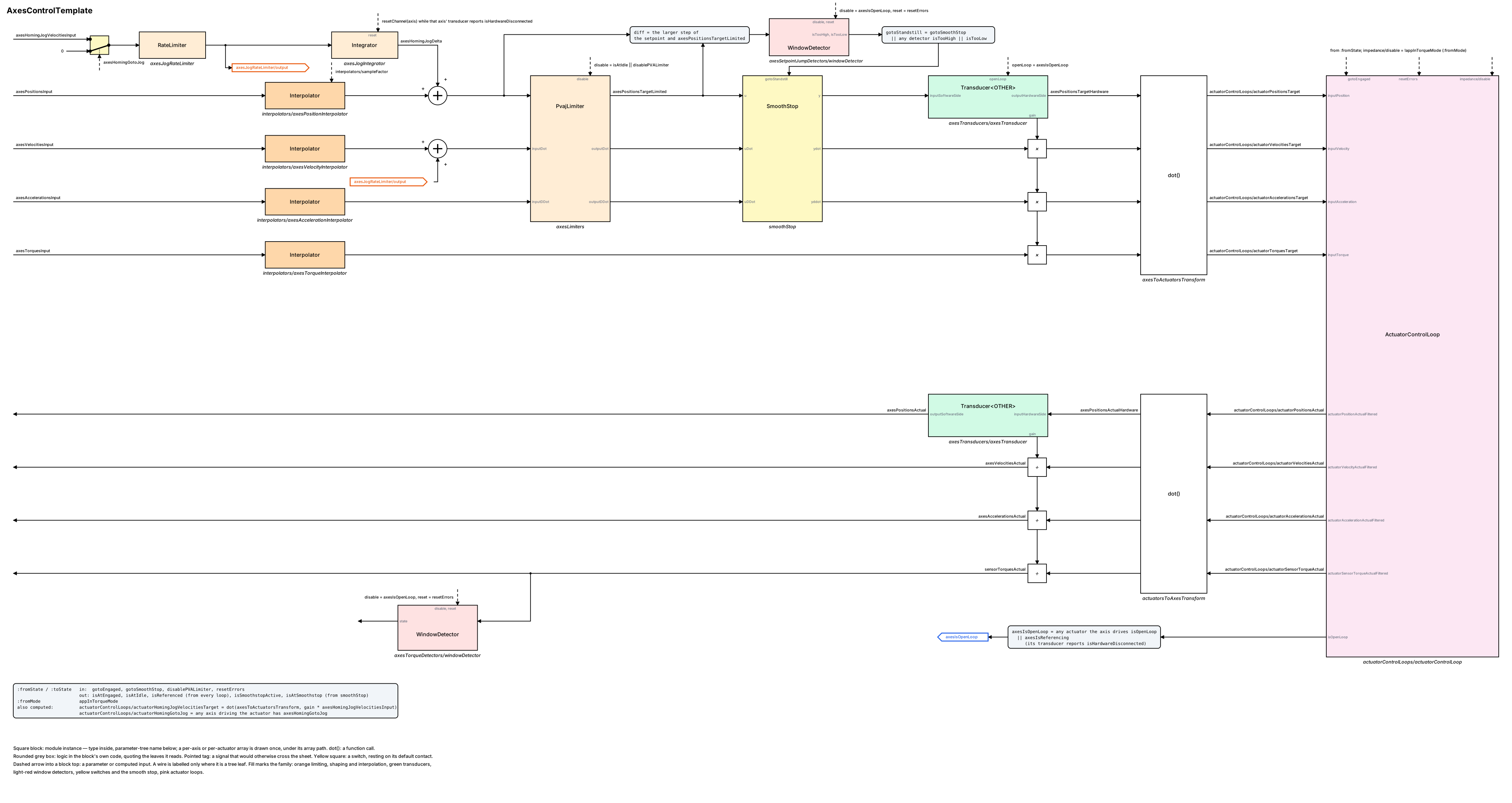
The round trip on one sheet. Setpoints flow right on four lanes — position,
velocity, acceleration, torque — through the interpolators, the axis jog sums,
axesLimiters, smoothStop, the axis transducer (position) and the transducer
gain (the other three, the × squares), the axes-to-actuators product dot()
and into the actuator control loops. The measured state comes back left on four
lanes through the actuators-to-axes product, the same transducer (position) and
the reciprocal gain (÷), leaving as axesPositionsActual,
axesVelocitiesActual, axesAccelerationsActual and sensorTorquesActual. A
per-axis or per-actuator array is drawn once, under its array path, because the
count is a configuration choice. Square blocks are sub-modules, dot() a
function call, grey rounded boxes logic in this block’s own code, the yellow
square a switch resting on its default contact, and a pointed tag a signal that
would otherwise cross the sheet.
Signals
Inputs
| Path | Unit | Range | Description |
|---|---|---|---|
axesPositionsInput |
axis unit | unbounded | The commanded position per axis. Interpolated, limited, then converted to actuator space. |
axesVelocitiesInput |
axis unit per second | unbounded | The commanded velocity per axis. |
axesAccelerationsInput |
axis unit per second² | unbounded | The commanded acceleration per axis. |
axesTorquesInput |
torque unit | unbounded | The commanded torque per axis. Only present when the actuator loops were built with torque support. |
axesHomingJogVelocitiesInput |
axis unit per second | unbounded | A jog speed per axis, for homing. Maps onto every actuator that axis drives. |
axesHomingGotoJog |
- | true or false | Enables that jog, per axis. |
Outputs
| Path | Unit | Description |
|---|---|---|
axesPositionsActual |
axis unit | Where each axis is, transformed back from the actuator measurements. |
axesVelocitiesActual |
axis unit per second | |
axesAccelerationsActual |
axis unit per second² | |
sensorTorquesActual |
torque unit | Per axis, when the actuator loops have torque sensors. |
axesIsOpenLoop |
- | Per axis: the position loop is not closed. True when no actuator driving that axis is closing its loop, and also when their contributions cancel — check it before trusting an axis’s position. Also true while that axis’s transducer is latched after a reference. |
axesIsReferencing |
- | Per axis: the transducer is in its post-referencing hold. While set, that axis reports open loop, and its setpoint-jump and torque detectors are disabled so the re-based setpoint cannot trip them. |
axesPositionsTargetLimited |
axis unit | The axis position target after the limiters, before the jog delta and the transducer. |
axesPositionsReference |
axis unit | The limiter output actually followed. |
axesVelocitiesReference |
axis unit per second | |
axesAccelerationsReference |
axis unit per second² | |
axesHomingJogDelta |
axis unit | Per axis: the accumulated jog offset, added to the commanded position. Exactly zero when no jog has been commanded. It is not cleared by releasing the jog or by resetErrors — see the symptom table. |
axesPositionsTargetHardware |
axis unit | The axis position target on the hardware side of the transducer — what enters the axis-to-actuator conversion. For commissioning. |
axesPositionsActualHardware |
axis unit | The measured axis position on the hardware side — what leaves the actuator-to-axis conversion. |
Parameters
| Path | Unit | Default | Range | Effect |
|---|---|---|---|---|
interpolators/sampleFactor |
- | — | 1 upward | How many control cycles pass between updates from your motion source. 1 disables interpolation. Interpolating adds one source period of delay — acceptable when this block runs faster than the planner feeding it. |
That is the only parameter at this level. The rest is in the sub-trees:
| Path | Effect |
|---|---|
axesLimiters/… |
The per-axis position, velocity, acceleration and jerk limits. The main safety configuration. |
axesTransducers/axesTransducer<NN>/… |
Per axis: its gain, its zero point, and its referencing. <NN> is 1-based and two digits, so axis 0 is axesTransducer01. See below. |
axesJogRateLimiter/rateLimit |
How fast a commanded axis jog velocity may change, per axis. Default 1.0 axis-unit per second per second. |
axesJogIntegrator/… |
Bounds on the accumulated jog delta. outputLimiterEnable with outputLimiterMin / outputLimiterMax; all disabled by default, so the delta is unbounded until you bound it. |
smoothStop/… |
How the machine is brought to rest on a stop or a detected setpoint jump. |
axesSetpointJumpDetectors/windowDetector<N>/… |
Per axis: how large a setpoint jump must be to count as a fault. |
axesTorqueDetectors/windowDetector<N>/… |
Per axis torque supervision, on torque-capable builds. |
actuatorControlLoops/actuatorControlLoop<N>/… |
A complete actuator control loop per actuator. See the ActuatorControlLoop page. |
All are persistent and survive a controller restart.
Axis transducers
One per axis, under axesTransducers/axesTransducer<NN>/. The stage sits
between the axis coordinate your application commands — the software side —
and the coordinate the axis-to-actuator conversion uses, the hardware side.
Position:
hardware = gain × software + offset, and backsoftware = (hardware − offset) / gain. Velocity, acceleration, torque and jog velocity carry the gain only, with no offset.gain = gainNum / gainDen. WithgainNum1,gainDen1 andoffset0 the stage is an exact identity.
| Path | Unit | Default | Range | Effect |
|---|---|---|---|---|
gainNum |
- | 1 | non-zero | Numerator of the axis gain. A zero is out of range and is silently reverted to the last accepted value every cycle, so a rejected write leaves the old gain in force with no error. |
gainDen |
- | 1 | above 0 | Denominator. Same silent reversion. |
offset |
axis unit, hardware side | 0 | unbounded | The axis zero point. Written by referencing; it survives a restart only if your configuration writes it back. |
referencing/useSoftwareReferenceExternal |
- | true | - | Selects which reference value a reference request uses. |
referencing/softwareReferenceExternal |
axis unit | — | unbounded | The reference value used when the switch above is true. An input, so it can be linked. |
referencing/softwareReferenceInternal |
axis unit | — | unbounded | The reference value used when the switch is false. |
referencing/reconnectToleranceHardwareSide |
axis unit, hardware side | 2 | above 0 | How close the recomputed hardware output must come to the frozen one before the transducer reconnects. The default is wrong for an axis — see Limits and errors. |
To reference an axis:
- Jog it with
axesHomingJogVelocitiesInputandaxesHomingGotoJog. The commands reach every actuator that axis drives. - Optionally snapshot a known point with
referencing/:fromState.setHardwareSnapshot. SethardwareSnapshotTargetto snapshot a specific hardware-side value instead of the live one — but note 0.0 there means “no target given” and falls back to the live input, so an exact hardware value of 0.0 cannot be snapshotted this way. - At the home position, assert
referencing/:fromState.setHardwareReference. The transducer computesoffset = snapshot − reference × gainand the axis then reads the reference value. - Watch
axesIsReferencingfor that axis go false. Until it does, the transducer has frozen its hardware-side output and the axis is held. referencing/:fromState.resetclears a latch that will not resolve.
Per-axis referencing status is read from
axesTransducers/axesTransducer<NN>/referencing/:toState. This block’s own
:toState.isReferenced is unrelated — it still reports the actuator
referencing state.
Setup
-
Commission each actuator loop individually first, under
actuatorControlLoops. Get every transformation, gearbox ratio and window detector right one actuator at a time. Nothing at this level can be checked until they are. -
Set the two axis-to-actuator matrices from the machine’s mechanics. They are checked for dimension — a mismatched matrix is rejected.
-
With everything disengaged, move each axis by hand and confirm
axesPositionsActualreads correctly. This is the check that the matrices are the right way round. -
Confirm
axesIsOpenLoopreads true on every axis while the drives are off. -
Set the per-axis limits under
axesLimitersto values the machine cannot be hurt by. Start conservative. -
Set
interpolators/sampleFactorfrom your motion source’s real update rate. -
Set the setpoint-jump detectors so a plausible planner glitch is caught but normal motion is not.
-
Engage one axis at a time, at low speed.
Step 8 moves the machine under your motion source’s control. With several actuators per axis, a matrix error moves more than one drive. Have the stop within reach and the axis limits tight.
-
Confirm
axesIsOpenLoopgoes false on the axes you engaged. -
If an axis needs a zero point of its own — a coupled or differential axis — set its
axesTransducers/axesTransducer<NN>gainNumandgainDenbefore referencing it, and setreferencing/reconnectToleranceHardwareSideto a few thousandths of an axis unit. ReadgainNumandgainDenback; an out-of-range write is reverted silently. -
Reference that axis with the procedure above and confirm
axesIsReferencinggoes false andaxesPositionsActualreads the reference value. -
If you use axis-level jogging, link either the axis-level jog inputs or the actuator-level
actuatorControlLoops/actuatorHomingJogVelocitiesTarget— never both. A configuration that links both applies the jog twice.
Tuning
- All the loop tuning is per actuator, one level down. This level is limits, interpolation and stopping behaviour.
- Set the axis limits from what the mechanism can take, expressed in axis units. They apply before the conversion to actuator space, so one axis limit protects every actuator that axis drives.
- Raise the limits in steps, re-testing each time, rather than setting them from a datasheet and hoping.
- Set
interpolators/sampleFactorto the true ratio between this block’s rate and your motion source’s. Too low shows as a step at each source update; too high shows as staleness. - If the interpolation delay matters — a machine where this block is inside a feedback path — run the source at this block’s rate and set the factor to 1.
- Tune the smooth stop so an emergency stop is firm but does not itself become a fault. Test it deliberately.
- Set the setpoint-jump detectors last, once you know what a normal setpoint stream looks like.
- Re-check the axis limits after any change to the matrices — the same axis limit means a different actuator motion once the coupling changes.
- Set the axis jog rate on
axesJogRateLimiter/rateLimit, per axis. Releasing a jog does not stop the delta growing at once: the velocity ramps down at this rate and the delta keeps accumulating until the ramp reaches zero. - Bound the jog delta with
axesJogIntegrator/outputLimiterEnableand its min and max if a runaway jog would be a hazard. It is unbounded by default. - Do not tune an axis transducer’s
gainNum,gainDenoroffseton an engaged axis. They are read every cycle with no hold and no smoothing, so a write steps the hardware-side target — and an engaged actuator’s target — in a single cycle. The axis setpoint-jump detectors run on the software side and never see it. - Re-reference an axis after any gain change. The offset was computed against the old gain, so changing the gain afterwards moves the hardware target and the measured position jumps.

The gap between the two traces is motion your source asked for and did not get. If that gap is routine, your source and your limits disagree.
| Symptom | Cause | Action |
|---|---|---|
| An axis moves the wrong actuators | The axis-to-actuator matrix is wrong or transposed | Move each axis by hand and check axesPositionsActual |
| A matrix was rejected | Its dimensions do not match the axis and actuator counts | Check both counts; they need not be equal to each other |
axesIsOpenLoop stays true on an engaged axis |
No actuator driving that axis is closing its loop, or their contributions cancel | Check each actuator loop’s own engage state |
| An axis reads a position but is not controlled | Same cause — this is what axesIsOpenLoop exists to tell you |
Do not trust the axis until it reads false |
| The machine will not follow the commanded speed | The axis limiters are clamping | Compare the input and actual traces; raise the limits if the machine can take it |
| Motion is stepped | interpolators/sampleFactor is lower than the real ratio |
Set it to the true ratio |
| Motion lags the command | The interpolator adds one source period | Run the source at this block’s rate and set the factor to 1 |
| The machine stopped by itself | A setpoint-jump detector fired and the smooth stop ran | Check the detectors and your setpoint stream |
| The stop itself caused a fault | The smooth stop is too aggressive for the axis limits | Soften the stop, or widen the limits |
| A jog moved more actuators than expected | Expected: a jog maps onto every actuator that axis drives | Nothing |
| A fault will not clear | The detectors latch until reset | Assert resetErrors on this block’s state input. It clears every actuator and every axis at once — there is no per-axis reset |
| Torque signals are missing from the tree | The actuator loops were built without torque support | Fixed when the controller is built |
| I need more axes or actuators | Both counts are fixed when the controller is built | Rebuild |
| One actuator behaves differently from the rest | Its own loop is configured differently | Compare the two loops' sub-trees |
An axis is stuck after referencing, reporting axesIsReferencing forever |
Nothing re-based the software side, so the reconnect condition is never met. The hardware output stays frozen — safe, but held | Have the application follow axesIsReferencing and set its axis setpoint to the measured actual; or assert referencing/:fromState.reset |
| A reference request did nothing | The transducer is still latched from the previous one; requests are ignored while disconnected | Wait for axesIsReferencing to clear, or reset the latch |
| The axis jumped when the transducer reconnected | referencing/reconnectToleranceHardwareSide is still at its default of 2, which is enormous in axis units |
Set it to a few thousandths of an axis unit and re-reference |
| An axis position jumped after a gain change | Expected: offset was computed against the old gain |
Re-reference the axis after every gain change |
A write to gainNum or gainDen had no effect and reported nothing |
Expected: an out-of-range value is silently reverted to the last accepted one every cycle | Read both back; use a non-zero numerator and a positive denominator |
| A jog moved the machine twice as far as commanded | Both the axis-level and the actuator-level jog paths are linked | Link one of the two, never both |
| An axis holds a standing offset that nothing clears | Expected: the jog delta is cleared only while that axis is in its post-referencing hold. Releasing the jog, an open-loop axis and resetErrors all leave it alone |
Read axesHomingJogDelta; reference the axis to clear it |
| A jog kept accumulating after being released | Expected: the velocity ramps down at axesJogRateLimiter/rateLimit and the delta integrates until it reaches zero |
Raise the rate limit if the overshoot matters |
| A referenced axis reads open loop | Expected while axesIsReferencing is set: a frozen hardware side has no usable closed position loop |
Wait for the hold to clear |
A starting point, after every actuator loop is commissioned:
interpolators/sampleFactor = <control rate ÷ motion source rate>
axesLimiters/…             = <conservative per-axis limits>
Limits and errors
| Limit | Set by | What happens | Reported |
|---|---|---|---|
| Axis motion | axesLimiters sub-tree |
Position, velocity, acceleration and jerk are limited per axis, in axis units, before conversion | The limiters' own outputs |
| Matrix dimensions | Checked | A matrix whose dimensions do not match the axis and actuator counts is rejected | Not applicable |
| Loop closure | Computed | axesIsOpenLoop accounts for signed cancellation — two actuators whose contributions cancel do not count as closing the axis |
axesIsOpenLoop |
| Setpoint jumps | axesSetpointJumpDetectors |
A jump beyond the configured window triggers the smooth stop | Each detector’s flags |
| Stopping | smoothStop sub-tree |
Brings the machine to rest on a stop request or a detected jump | Not reported |
| Interpolation | interpolators/sampleFactor |
Upsamples the axis inputs and adds one source period of delay | Not reported |
| Per-actuator limits and faults | Each actuator loop’s own sub-tree | Applied independently, after the axis-space limits | Each loop’s outputs |
| Fault reset | This block’s state input | Asserting resetErrors there clears every actuator loop’s detectors and every axis torque detector at once. There is no per-axis or per-actuator reset |
Not reported |
| Axis gain and offset | axesTransducers/axesTransducer<NN> |
Applied every cycle with no hold and no smoothing. A live write steps the hardware-side target in one cycle, invisibly to the axis setpoint-jump detectors | Not reported; read axesPositionsTargetHardware |
gainNum ≠ 0, gainDen > 0 |
Fixed | An out-of-range value is silently reverted to the last accepted one, every cycle. A rejected write leaves the previous gain in force | Not reported; read both values back |
| Post-referencing hold | The reconnect condition | The hardware-side output is frozen until the recomputed value lands within referencing/reconnectToleranceHardwareSide for more than 100 consecutive cycles. It is a re-basing wait, not a timer, so it does not time out |
axesIsReferencing, referencing/:toState.isHardwareDisconnected |
referencing/reconnectToleranceHardwareSide |
Default 2 | Sized for a transducer whose hardware side carries encoder ticks. An axis transducer’s hardware side carries axis units, where 2 would let a whole offset step through | Not reported; set it per axis |
| Jog delta | axesJogIntegrator |
Unbounded by default. Cleared only while that axis is in its post-referencing hold — not by releasing the jog, not by an open-loop axis, and not by resetErrors |
axesHomingJogDelta |
| Jog path | Configuration | The axis-level and actuator-level jog paths are both live. Linking both applies the jog twice | Not reported |
| Torque signals | Fixed at build time | Present only when the actuator loops were built with torque support | Missing paths |
| Axis and actuator counts | Fixed at build time | Independent of each other, and not changeable from the tree | Not reported |
This block logs nothing itself. The transducers log during referencing — both the per-axis ones and those inside each actuator loop. Every other condition above shows as a value on a trace, or not at all.
Verified against motorcortex-control3 3.33.0 (69625c1).