Connecting
5 minute read
Desk talks to a controller over WebSocket. You enter the controller’s hostname or IP address and nothing else, never a port number.
Connecting for the first time
Step 1 is the one people skip, and skipping it is the commonest reason a connection never completes.
-
Open the controller in an ordinary browser tab at
https://controller_ip_addressThe IP address of your controller. In most cases 192.168.2.100., and accept the certificate warning.Motorcortex controllers use a self-signed certificate, and a browser will not open a secured WebSocket to a certificate it has never been shown. It fails silently, so Desk just sits there.
-
In Desk’s Connection panel, type the same address without the scheme:
controller_ip_addressThe IP address of your controller. In most cases 192.168.2.100.. -
Fill in credentials if the controller wants them. Username defaults to
administrator; leave Password empty when no password is set. -
Click Connect, or press Enter in any of the three fields.
The chip in the Connection tab header turns Connected and the Parameters tree fills with the controller’s parameters. You are ready to plot something.
Step 1 is once per controller per browser. After that, the address is in the recent list and connecting is one click.
Reference
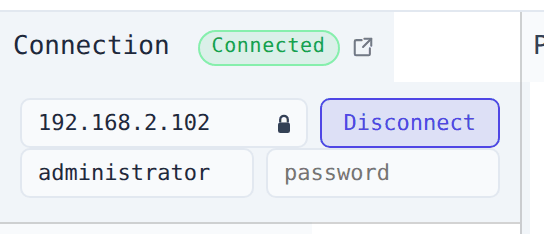
| Field | Description |
|---|---|
| URL | Controller hostname or IP address (e.g. controller_ip_addressThe IP address of your controller. In most cases 192.168.2.100. or controller.local) |
| Lock icon | Toggle between secured (wss://) and insecure (ws://) WebSocket |
| Username | Defaults to administrator |
| Password | Leave empty when no password is set |
| Connect / Disconnect / Switch | Opens or closes the session, or retargets it. See the Switching tab |
The URL, the secured flag and the username are remembered in the browser; the password is not.
Pasting a full URL works too: wss://controller_ip_addressThe IP address of your controller. In most cases 192.168.2.100. sets the host and flips the lock to secured, ws://… to
insecure.
Recent controllers
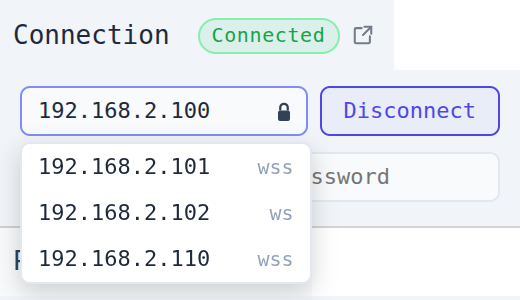
Clicking into the address field drops down the last five controllers you connected to successfully, so a typo never joins the list. Typing narrows it, and the controller already in the field is left out.
- Click an entry, or walk to it with ↑ / ↓ and press Enter, to fill in both the host and its scheme; the lock icon follows.
- Press Escape to close the list.
The same controller reached over both ws:// and wss:// is one entry; the scheme you last used wins.
Desk connects with wss:// (encrypted) by default. Click the lock icon to fall back to ws:// for a controller without TLS.
The certificate, and why a connection can fail silently
Motorcortex controllers use a self-signed certificate. A browser will not open a wss:// WebSocket to a certificate
it has never been shown, and it does so without a visible error. Desk simply never reaches Connected.
Warning
Before the first wss:// connection, open the controller in a browser tab (e.g. https://controller_ip_address) and accept the warning. Without that the browser blocks the WebSocket silently.
You do this once per controller per browser.
Ports
You never type a port.
- Classic controllers expose two WebSocket ports: 5568 for request/reply and 5567 for the live data stream.
- Newer images put both behind a single TLS port through a reverse proxy.
Desk probes for the single-port arrangement on connect and falls back to the two-port scheme when the probe fails.
The state is a chip in the Connection tab header, so it stays visible even when another tab is in front.
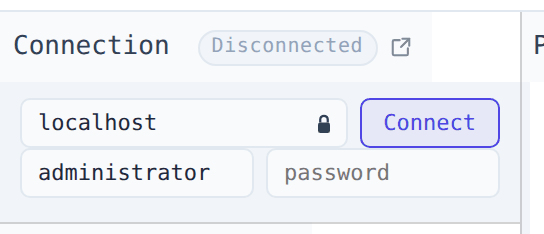
| Status | Meaning |
|---|---|
| Disconnected | No session; click Connect |
| Connecting… | Opening the session and loading the parameter tree |
| Connected | Live: parameters poll and subscribed traces stream |
| Reconnecting… | The data stream dropped; Desk is re-establishing it automatically |
Reconnecting is not the same as connecting again
Desk holds two sockets. When only the pub/sub socket dies it reconnects on its own and resumes streaming into the existing traces. Your trace list, colours and axes are all kept, and there is nothing for you to do but wait.
Reconnecting… is therefore normal on a busy network and not a reason to press Disconnect.
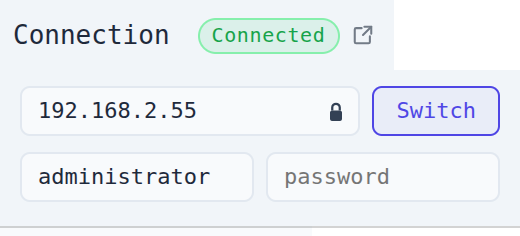
While a session is up, typing a different address (another host, or the same host with the lock flipped) changes the button from Disconnect to Switch, with a tooltip naming the target. Pressing it hangs up and dials the new controller as soon as the old session is down. Typing the live host back restores Disconnect.
Warning
Switch ends the running session and its traces, exactly as Disconnect does. Both carry the same styling for that reason.
What happens to your traces
Traces survive a reconnect on purpose: that is what you want for the same machine.
Connecting to a different controller is another matter. Desk validates every subscribed path against the new
parameter tree and removes the ones that are not there, or whose channel index is out of range, reporting what went
with a toast such as Removed 3 signals not on this controller. The rest resubscribe normally.
Live data and Replay are exclusive
Loading a file in the Replay panel disconnects a live session, and starting a connection clears loaded replay traces. Desk switches for you. There is nothing to disable first.