Position transformation
4 minute read
The position transformation turns the ticks the drive reports into the axis position at the load, and turns the position target back into ticks. All paths are under root/AxesControl/actuatorControlLoops/actuatorControlLoopNN/.
Set it up in this order; click a step to jump to it.
Enter the encoder and gearbox
Three things turn ticks into a position: the encoder resolution, the unit you count in, and the gearbox. The first two are under positionTransformation/transducer/, the gearbox is on the control loop itself. Together they make the gain: ticksPerRevolution × gainNum / gainDen ticks per unit at the motor, divided by the gearbox ratio at the load.
| Parameter | What it does | Default | Rotary axis in rad | Linear axis in m |
|---|---|---|---|---|
ticksPerRevolution |
Encoder ticks per motor revolution | 1 |
1048576: 20-bit encoder |
524288: 19-bit encoder |
gainNum, gainDen |
Motor revolutions per unit, as a fraction. A negative gainNum reverses the direction |
1, 1 |
1, 6.283185: one revolution is 2π rad |
1, 1: count in revolutions |
gearboxLoadSide, gearboxMotorSide |
Motor revolutions per revolution, or metre, at the load. Leave at 1 if the drive applies the gearbox itself |
1, 1 |
80, 1: 80:1 gearbox |
100, 1: 100 motor revolutions per metre |
offset |
Ticks at the zero position | 0 |
Set by homing | Set by homing |
- Rotary axis: the standard robot configuration uses these values, with a 1:1 gearbox.
- Linear axis: a motor turns a spindle with a 10 mm pitch through two pulleys of the same size, so the carriage moves 10 mm per motor revolution. Counting in revolutions and setting the gearbox to 100:1 makes the axis read metres.
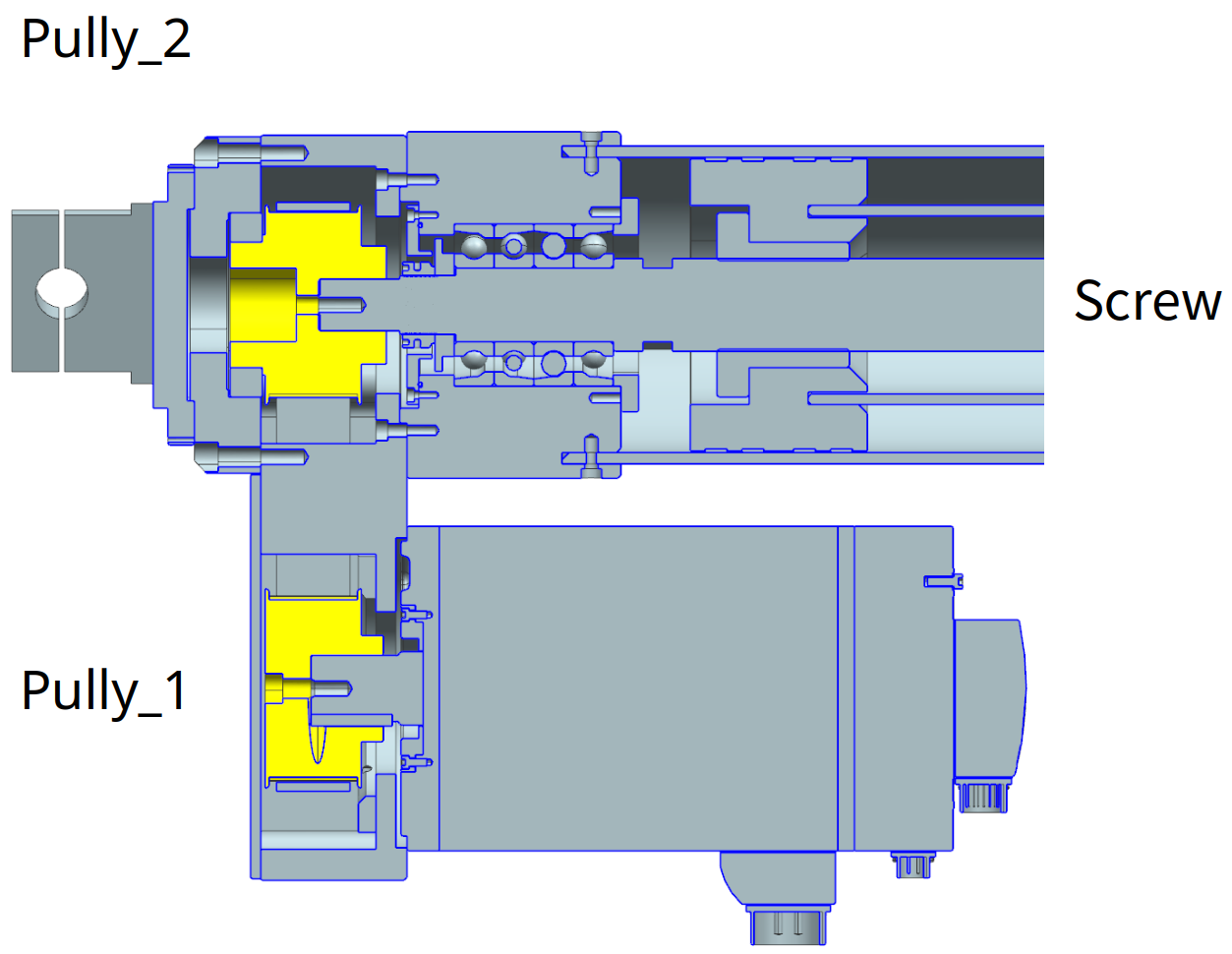
To check your numbers, read back positionTransformation/transducer/gain, the ticks per unit at the motor, and move the axis a known distance while you watch actuatorPositionActual. The positions of all axes together are in root/AxesControl/axesPositionsActual.
Check the direction
Position, 3D view and controllers all assume the axis counts up when it moves in its positive direction. If it counts down, the 3D view moves the wrong way. If position, velocity and torque disagree in sign, a controller pushes the axis away from its target instead of towards it.
- Engage the axis and jog it a small distance in the positive direction.
- Watch
actuatorPositionActual, and the 3D view if your application has one. Both must move the same way as the real axis. - If they move the other way, make
gainNumnegative. Do the same in the velocity and torque transformations, so all three agree.
Set the zero position
Right after start-up the encoder’s ticks say nothing about where the axis is. Homing, also called referencing, fixes that: with the axis at a known position, the transducer stores the offset that makes it read that position:
offset = ticks at that moment − reference position × gain
From then on the axis reads the right position everywhere.
- Move the axis to a position you know, for example straight up at 0°.
- Reference the axis. In the standard robot GUI: enter the position in Reference on the axis settings tab and press Reference, or Reference All for every axis. See Homing.
- Check that
actuatorPositionActual, and the 3D view, now match the real axis. - Save the parameter tree, so the offset survives a restart.
Keep the position after a power cycle
You only need this for an encoder that does not keep its position without power, such as one that only counts within one turn. Without it you home the axis after every power cycle. Persistence stores the position at power off and checks it at start-up:
Parameter under positionTransformation/transducer/ |
What it does | Default |
|---|---|---|
enablePersistence |
1 stores the ticks and offset in persistence.bin and checks them at start-up |
0 |
deltaTicksMax |
The largest movement, in ticks, that still counts as the same position. The standard robot configuration uses 10000 |
-1 |
deltaTicks |
Output: how far the encoder moved while the power was off | |
enableSingleTurnCounter |
1 counts the whole turns of an encoder that restarts at 0 every turn |
0 |
- Set
enablePersistenceto1anddeltaTicksMaxto the movement you accept, then save the parameter tree. - Home the axis.
- Switch the controller off and on, and read
deltaTicks: it shows how far the encoder moved in between.
If deltaTicks is larger than deltaTicksMax, leaving Off raises the emergency stop ES_NOT_REFERENCED (508). Home the axis again to clear it.