Velocity transformation
less than a minute
The velocity transformation turns the drive’s Velocity actual value into rad/s or m/s at the load, and the velocity target back into drive units. It has no offset. Paths are under actuatorControlLoopNN/velocityTransformation/transducer/.
Using the standard robot GUI?
The velocity transformation is under Motor Velocity on the axis settings tab. Press Save Settings to keep your changes. See Robot axis settings.
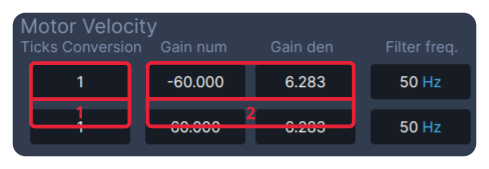
- Ticks Conversion:
ticksPerRevolution. - Gain num and Gain den:
gainNumandgainDen. The example,-60and6.283, is a drive that counts in rpm, with the direction reversed.
Choose the values from the unit the drive uses:
| Drive unit | ticksPerRevolution |
gainNum |
gainDen |
|---|---|---|---|
| Revolutions per second | 1 |
1 |
6.283185 (2π) |
| rpm | 1 |
60 |
6.283185 |
| 0.001 rpm | 1000 |
60 |
6.283185 |
| Encoder ticks per second | the encoder resolution | 1 |
6.283185 |
The gearbox ratio of the axis applies here too. Give gainNum the same sign as in the position transformation.
Velocity from the position
To derive the actual velocity from the position instead of the drive’s velocity value, set actuatorControlLoopNN/usePositionActualFilteredForVelocity to 1. Use this when the drive’s velocity value is not mapped in its PDOs.